WEB 209: Advanced CSS
Add flexbox to your web toolkit
Looking to take your CSS to the next level? In this online CSS course, you'll learn how to utilize flexbox, a new set of CSS properties that easily adapt to different screen sizes and different sizes of content, providing limitless, robust ways to structure page content, and design navigation, column-based layouts, even sticky footers! Working with an expert instructor, you'll study how to how to use flexbox with scalable vector graphics (SVG) and CSS3 animation, adding interactive and creative power to your Web graphics.
About This Course
Project-Based Learning
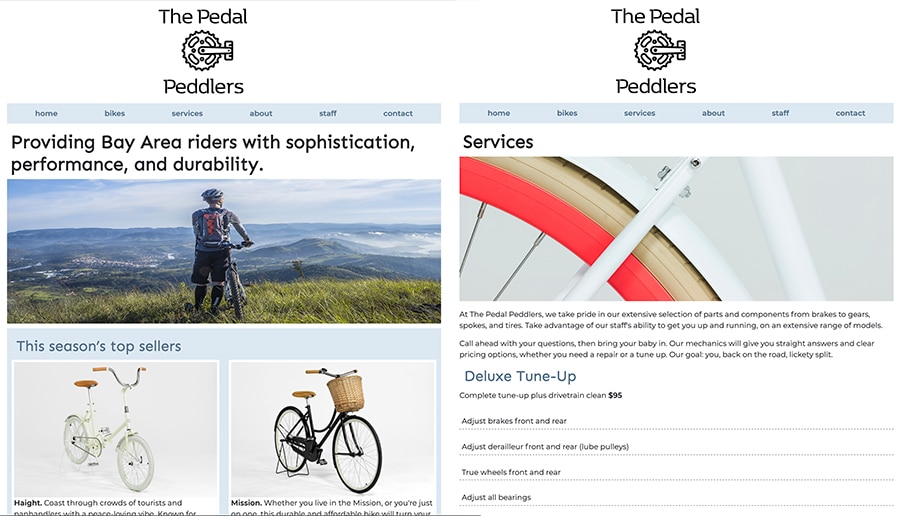
Create a custom small business site using CSS and flexbox to produce a unique design and logo.
What Skills Will I Develop?
Students in this course can expect to learn to:
- Define what flexbox is and what it is used for.
- Make flexbox sites and SVG images accessible for older browsers if needed.
- Use flex container properties to create flexible layouts.
- Define the benefits of using SVG images compared to other image types.
- Create an SVG image and animate it for the Web using CSS3 transitions
- Use flex item properties to size and align content.
- Use mobile queries and CSS to adapt layouts for mobile devices.
- Use flex shorthand to write more compact code.
- Use order settings to arrange the display order of flex items.
- Use nested flex containers to create complex layouts.
- Use flexbox to create navigation bars, 2 and 3-column layouts, and sticky footers.
- Explore some creative applications for SVG animation using the GreenSock animation library.
What Software and Supplies Do I Need?
To take this course you'll need:
- Computer with Internet connection.
- Adobe Photoshop or equivalent digital imaging program.
- Experience in coding HTML and CSS.
Course Instructor(s)
The course is taught by the following instructor(s):

Piper Nilsson is a graphic/Web designer and educator. Piper has been working with the Web since 1997, working in various roles as a designer, programmer, and information architect, Piper blueprinted sites for such global clients as MetLife, Pepsi, ETS, and Citibank.
Course Outline
Getting Started with Flexbox
Back when the original CSS (Cascading Style Sheets) specification was written in 1994, smart phones, tablets, and Internet TVs hadn't been invented. How will CSS adapt to a multiscreen future? Lesson One has solution: an emerging set of CSS properties called flexbox. The lecture begins with an exploration of what flexbox is and what kinds of design problems it solves. You'll learn how to use flex container properties to design the major elements on a page. Then you'll explore the benefits of using SVG images to create efficient, high resolution, animated graphics.
Flexbox in Action
It's time to fine-tune flexbox layouts using flex item properties. Flexbox allows you to create layouts that produce consistent results for different screen sizes - even if your content varies from page to page. Lesson Two explores how to define the size of each flex item and create layouts that reorder elements depending on the user device. As you'll discover, nesting your flex containers can help you achieve complex layouts and smoothly integrate page content with other standard elements such as navbars, columns, and sticky footers.
Production and CSS Animation
In order to produce your flexbox sites, you need to know how to add prefixes to make your site work in back-level browsers. In Lesson Three, you'll learn how add vendor prefixes to make flexbox accessible in as many browsers as possible. You'll wrap up the course with an expanded look at the many options for SVG animation and try out the GreenSock animation library.
Frequently Asked Questions (FAQ)
How Do The Courses Work?
Our courses are project-based and instructor-led. In each course you’ll complete a series of lectures, projects, discussions, and critiques designed to stretch your creative skills. Weekly assignment deadlines keep you on track, and with no set-logins or Zoom meetings, you can build your studies around your schedule.
Who Are The Instructors?
Our courses are developed and taught by our industry-leading faculty of creative professionals. This means that you’ll learn in-demand skills, get feedback on your work, and build a portfolio of creative work. View our Student Gallery for featured student projects.
When Can I Start?
Classes start January, April, and August, and this course can be completed as part of a 15-week term in 8 weeks. College credit from this course can be applied to a range of degree and certificate programs at Sessions College.
How Do I Register?
To register for a program, complete our program application. To register for this course on an individual basis, please contact our admissions team at admissions@sessions.edu. An Admissions Advisor will contact you to setup your enrollment.
| Course Tuition and Fees | |
|---|---|
| Tuition | $350/credit |
| Registration Fee* | $200 |
| Total Course Price | $725 |
Registration fees are nonrefundable after 5 days from enrollment.
Is Sessions College Accredited?
Yes. Since 2001, Sessions College has been accredited by the Distance Education Accrediting Commission (DEAC). The Distance Education Accrediting Commission is listed by the U.S. Department of Education as a recognized accrediting agency and is recognized by the Council for Higher Education Accreditation (CHEA).
RELATED PROGRAMS AT SESSIONS COLLEGE: