DIG 210: Animate I
Learn the basics of 2D animation with Adobe Animate
In this course you'll get a thorough, hands-on introduction to Animate, learning how to draw and import artwork, organize it using symbols and layers, and animate it using a range of techniques from basic tweening to frame-by-frame animation. Animation techniques you'll cover will include motion tweening, scaling and rotating objects, nested animations, animating objects on a path, masks, and lip syncing. You'll also master new techniques to make your animations more fluid and realistic. By the end of the course you will have created your own animated instructional or educational video.
About This Course
Project-Based Learning
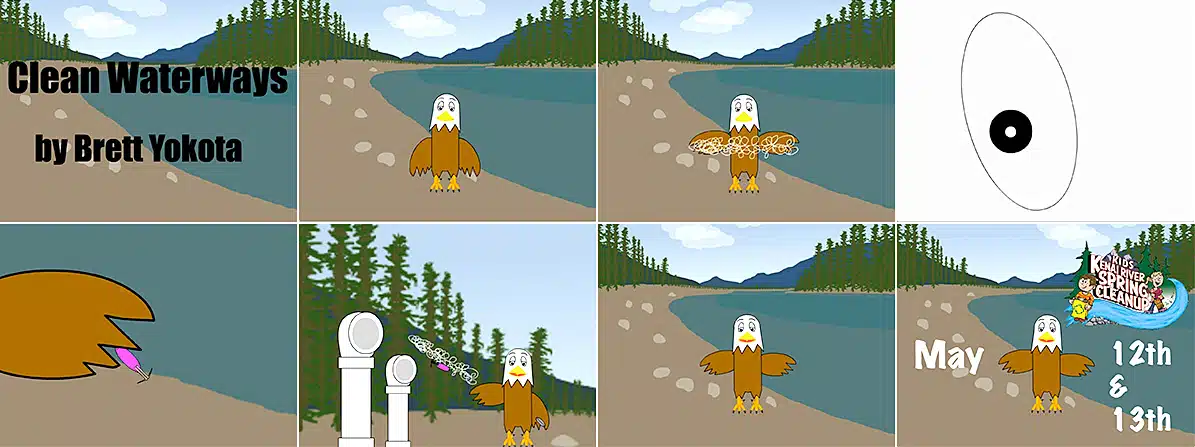
In this course, you'll create an animated informational movie step by step, creating a character and storyline, developing your scene and script,
applying basic and intermediate animation techniques, developing an animated storyboard and adding audio.
What Skills Will I Develop?
Students in this course can expect to learn to:
- Analyze the evolution of Animate from Flash and understand the purposes of the new Animate tool.
- Create vector graphics in the Animate environment using drawing tools, fills and strokes, gradients, and transformations.
- Import vector, bitmap, and audio files into a project.
- Use groups, layers, and symbols to organize your artwork.
- Use tweens, keyframes, and motion paths on the timeline to control when graphics appear on the stage.
- Apply motion tweens to animate changes in the appearance and location of objects.
- Use easing to make the motion of objects more realistic.
- Create animations with objects oriented on a path, nested in other animations, and animated text and titles.
- Use static and animated mask layers to reveal or highlight certain features of your animation.
- Use frame-by-frame animation to create basic animations, including lip syncing.
- Storyboard and plan out a short instructional video presentation.
- Learn advanced and sophisticated animation techniques used by professional animators.
- Animate a 30-second instructional video incorporating character animation and audio.
What Software and Supplies Do I Need?
- Computer with Internet connection (broadband recommended.)
- Adobe Animate CC
Course Instructor(s)
The course is taught by the following instructor(s):
 Kevin Hedgpeth
Kevin Hedgpeth is an Arizona native who makes his home in Phoenix, where he actively writes and illustrates in addition to teaching college-level visual arts courses. He is co-author and illustrator of several published books.
Course Outline
Introduction to Animate
We will begin by exploring how Animate evolved and what it's used for. You'll begin with the basics for creating an educational or informational video: setting up a document, using drawing tools, add fill and stroke colors, create and modify shapes, grouping objects, and add depth to your artwork using gradients.
From Raster to Vector
In this week's class, you will learn how to import different kinds of media to support your animated project, including audio files and bitmap images to use as a reference for backgrounds. You'll learn some tips and techniques for the new Paint Brush tool and cover how to manage your artwork and keep your project organized with groups, layers, and symbols.
Tweens and Keyframes
Let's move! You'll learn how to animate graphics, starting with the basics of motion tweening, learning different ways to change the position, size, angle, and pace of an animation in Animate. You’ll also work with motion paths and learn how to modify them. Add a sense of realism to your animation using easing.
Intermediate Animation Techniques
In this week's session, you'll explore how to animate and orient objects along a path using motion guides, animate titles to introduce your topic, animate text to add 3D effects, and create nested animations to give your animation credibility.
Advanced Animation Techniques
This week, you will focus on creating static and animated mask layers to isolate features in your animation. Learn how to create practical masking techniques to show objects emerging in a 3-D environment, like a doorway or tunnel. Also, learn the basics of frame-by-frame animation and how to create lip syncing using this technique.
The Next Level of Animation
Here you will learn new techniques that will make your animations more fluid and realistic, including layer parenting, the Bone Tool, and the Asset Warp tool. You will also learn a more sophisticated process to make your characters talk using Animate’s Auto Lip Sync tool.
Frequently Asked Questions (FAQ)
How Do The Courses Work?
Our courses are project-based and instructor-led. In each course you’ll complete a series of lectures, projects, discussions, and critiques designed to stretch your creative skills. Weekly assignment deadlines keep you on track, and with no set-logins or Zoom meetings, you can build your studies around your schedule.
Who Are The Instructors?
Our courses are developed and taught by our industry-leading faculty of creative professionals. This means that you’ll learn in-demand skills, get feedback on your work, and build a portfolio of creative work. View our Student Gallery for featured student projects.
When Can I Start?
Classes start January, April, and August, and this course is completed in a 15-week term. College credit from this course can be applied to a range of Degree and Certificate programs at Sessions College. You can enroll in this course on an individual basis or as part of a program.
Explore our Programs: Bachelor's Degree | Associate Degree | Undergraduate Certificate
How Do I Register?
To register for a program, complete our program application. To register for this course on an individual basis, please contact our admissions team at admissions@sessions.edu. An Admissions Advisor will contact you to setup your enrollment.
| Course Tuition and Fees | |
|---|---|
| Tuition | $350/credit |
| Registration Fee* | $200 |
| Total Course Price | $1250 |
Registration fees are nonrefundable after 5 days from enrollment.
Is Sessions College Accredited?
Yes. Since 2001, Sessions College has been accredited by the Distance Education Accrediting Commission (DEAC). The Distance Education Accrediting Commission is listed by the U.S. Department of Education as a recognized accrediting agency and is recognized by the Council for Higher Education Accreditation (CHEA).
RELATED PROGRAMS AT SESSIONS COLLEGE: